Save a picture and you are asked to choose: JPG, PNG or WebP? The choice affects how big the file is, how sharp it looks, whether it can have a transparent background, and whether the website or app you are sending it to will accept it. Here is how to choose with confidence.
The quick answer
| If your image is… | Use | Why |
|---|---|---|
| A photo | JPG | Small files, looks great, accepted everywhere |
| A screenshot, chart or image with text | PNG | Keeps letters and lines perfectly crisp |
| A logo or icon with a see-through background | PNG | Supports transparency and is widely accepted |
| For your own website | WebP (or JPG) | Usually smaller than JPG and PNG at similar quality |
| For an upload form | Whatever the form asks for | Usually JPG; many forms don’t accept WebP |
JPG: best for photos
JPG (also written JPEG; they are the same format) uses lossy compression. When a photo is saved, fine detail that the eye barely notices is simplified, which makes files dramatically smaller. You choose how much with a quality setting.
- Good at: photos of people, places and things, with soft colour changes.
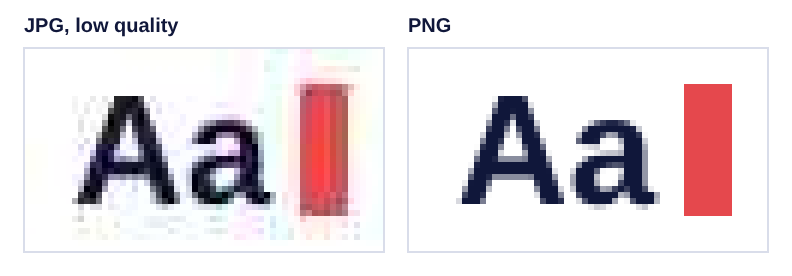
- Weak at: sharp edges and text. At lower quality you may see blotchy “halos” around letters and lines.
- No transparency. See-through areas have to be filled with a colour.
- Re-saving adds up. Each time a JPG is edited and saved again, a little more detail is lost. Keep an original and work from it.
PNG: best for screenshots, text and transparency
PNG uses lossless compression: every pixel is stored exactly. Nothing is lost no matter how many times you save it.
- Good at: screenshots, diagrams, logos, icons, anything with text or flat colours, and images with transparent backgrounds.
- Weak at: photos. A photo saved as PNG is usually several times larger than the same photo as a good-quality JPG, with no visible benefit.
That is why a phone screenshot of a photo can be surprisingly large: it is a photo stored in a format designed for graphics. Converting it with PNG to JPG usually makes it much smaller.
WebP: smaller files for the web
WebP is a newer format designed for websites. It can be lossy like JPG or lossless like PNG, supports transparency, and usually produces smaller files than either at similar visual quality. All current major web browsers can display it.
The catch is compatibility outside browsers. Some older photo editors, apps and many upload forms still accept only JPG and PNG. Use WebP for images on your own website, and JPG or PNG when sending files to other people or organisations.
The Image Compressor can save images as WebP (in browsers that support saving it), and its Auto setting uses WebP for images with transparency so they stay see-through while getting smaller.
HEIC, GIF and others
- HEIC (or HEIF) is the format many iPhones use for photos. It is efficient but not accepted everywhere, and most web browsers can’t open it. On an iPhone, Settings › Camera › Formats › Most Compatible makes the camera save JPG instead (Apple’s guide). Photos sent by email or chat are often converted to JPG automatically.
- GIF is an old format best known for short animations. It supports only 256 colours, so it is a poor choice for photos.
- BMP and TIFF are mostly uncompressed or used in printing and scanning. They are large and best converted to JPG or PNG for sharing.
When converting helps, and when it doesn’t
- PNG photo to JPG: helps a lot with file size. Use PNG to JPG and pick a background colour for any transparent areas.
- JPG to PNG: does not improve quality. Detail removed when the JPG was saved stays removed, and the file gets bigger. Do it only when a website or editing tool specifically needs PNG, using JPG to PNG.
- To a smaller file in the same format: use the Image Compressor, and see How to reduce a photo’s file size.
Frequently asked questions
Is JPEG different from JPG?
No. They are the same format. The shorter .jpg ending dates from older systems that allowed only three letters after the dot.
Which format has the best quality?
PNG, and lossless WebP, keep every pixel exactly. For photos, a high-quality JPG looks the same to the eye at a fraction of the size, so “best” depends on what the image is for.
Why did my logo get a white or black box around it?
It was saved as JPG, which can’t store transparency, so the see-through area was filled with a colour. Keep logos as PNG (or WebP for websites).
Tools used in this guide
All of them are free, need no sign-up, and work in your browser without uploading your files.